8 Best ATS Resume Checkers in 2026: What We Found After Testing All of Them
One resume, 8 popular ATS checkers, 8 different answers. What each tool is good at, which ATS recruiters actually use, and how to pick a checker for your search.

Kareeo Team
Career Content Team · · 9 min read
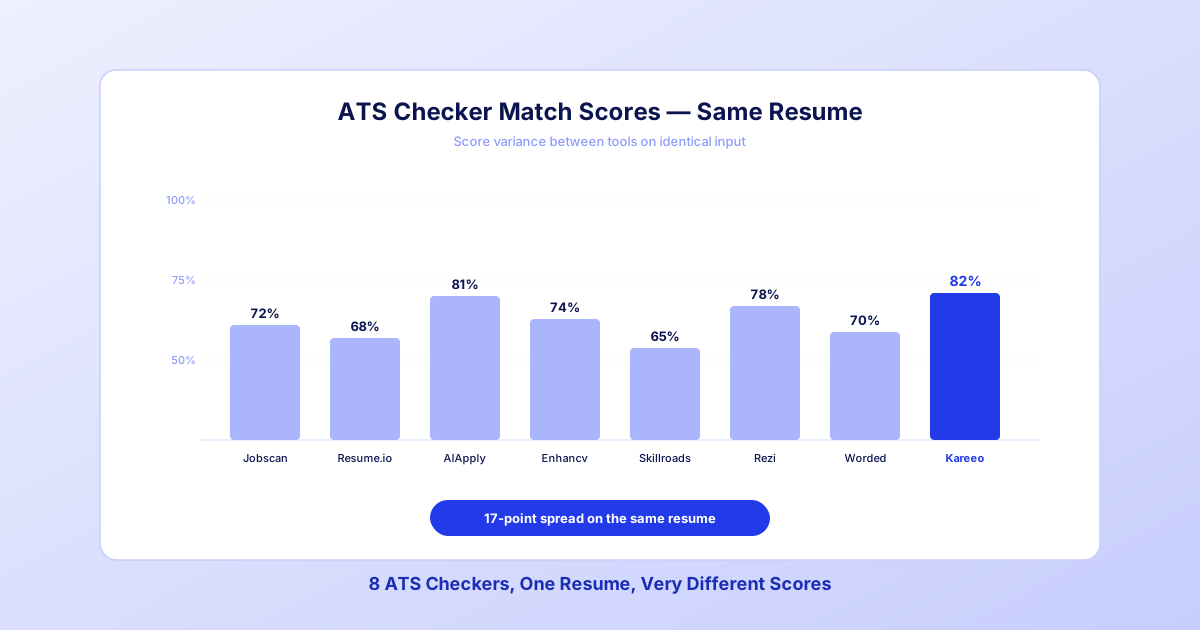
You've heard the advice: "Run your resume through an ATS checker." Sounds simple. Until you try three of them and get wildly different scores on the same resume. Which one is telling the truth?
Run one resume and one job description through the 8 most popular ATS resume checkers and you will not get one answer. You will get eight. Two tools tell you to add the same keyword. Another tells you to remove it. One flags a formatting error that isn't there.
Here's how these tools actually differ - and how to pick one that won't waste your time.
How We Tested
To make the comparison fair, we used one control resume (a mid-level product manager with 6 years of experience) and one control job posting (a Senior Product Manager role at a SaaS company). Every tool got the same inputs. We evaluated each on four dimensions:
- Scoring accuracy: Does the score reflect what a recruiter would actually see?
- Actionability: Are the recommendations specific enough to act on?
- Depth of feedback: Does it catch formatting issues, not just keywords?
- Price vs. value: Is the paid plan worth it?
No tool paid to be included. No affiliate links are in this post. Every conclusion is based on hands-on testing.
The 8 Tools, Ranked by What They Actually Do
1. Jobscan: Best for a match report against one posting
Jobscan pioneered the "paste your resume, paste the job description, get a match score" workflow, and its match report is still the core of the product: a side-by-side of the hard skills, soft skills and job titles your resume has and is missing. It has since added AI rewriting (AI Optimize), a job tracker, LinkedIn optimization and auto-apply.
What to watch: the match rate leans heavily on the posting's own wording, so a resume that describes the same work in different words can score low. Check how many scans the free tier includes before you start a long search.
Best for: Job seekers who want a detailed match report for each application, plus LinkedIn tools in the same account.
2. Resume.io / ResumeGenius — Best for first-timers
These two tools overlap enough to discuss together. Both focus on resume building with a lightweight ATS check bolted on. If you don't have a resume at all, they're useful. If you already have one, the ATS feedback is generic — mostly formatting tips that apply to every resume, not yours.
Best for: First-time resume writers who need structure.
3. AIApply — Best for bulk applications
AIApply's core feature is auto-apply: it finds matching jobs and submits applications for you. Its ATS scoring is a secondary feature and reflects that priority: you get a score, but the explanation is shallow. If you're playing the volume game, this is the tool. If you're trying to improve one resume, it's not.
Best for: High-volume applicants who prioritize speed over quality.
4. Enhancv — Best for design-forward resumes
Enhancv leans heavily into visual resume design with an ATS overlay. The ATS scanner is fine, but the tool's real value is balancing design with machine readability. If your industry is creative (design, marketing, content), this matters.
Best for: Creative professionals who need resumes that look good AND parse well.
5. Skillroads — Best for entry-level
Skillroads is built for junior candidates and career starters. Its ATS check is pared down, but the tool surfaces entry-level-appropriate advice: which certifications to add, how to frame academic projects, how to position internships. For a senior candidate, it's too basic. For someone early in their career, it's well-aimed.
Best for: Recent graduates and entry-level applicants.
6. Rezi — Best for template-matching
Rezi optimizes for ATS-friendly templates first, keyword matching second. The tool essentially says: "Start with our template, then we'll tell you what to add." That's the right order if you're rebuilding from scratch. Less useful if you're refining an existing resume.
Best for: Candidates rebuilding their resume from the ground up.
7. ResumeWorded — Best for LinkedIn integration
ResumeWorded scores both your resume AND your LinkedIn profile, which is its distinguishing feature. If you're applying cold (LinkedIn recruiter inbound matters) this dual-scan is genuinely useful. Job-specific scoring is available but shallower than Jobscan's.
Best for: Passive candidates who get noticed via LinkedIn as much as applications.
See what the software sees in your resume
Upload your resume for a free diagnosis. It is parsed the way an ATS parses it, read the way a recruiter reads it, and you get the fixes ranked by what moves your score.
Get my free diagnosisFree to try. No credit card required.
8. Kareeo: Best for running the whole search
Full disclosure: this is our tool. Here is what it does differently.
- A free diagnosis with no account: upload your resume and it is parsed the way an ATS parses it and read the way a recruiter reads it, with the fixes ranked. You do not need a job description for this step.
- A gap breakdown for each job: add a posting and Kareeo scores core skills, domain experience and role fit separately. It separates "you lack this skill" from "you have this skill but described it differently."
- Tailoring from your real experience: Kareeo generates a tailored version of your resume for each job from your stored work profile. It shifts emphasis and phrasing. It does not add experience you never entered.
- Tracking and interview prep: every job sits on one board from saved to offer, with an interview prep playbook built from that posting.
The tradeoff: Kareeo is designed for people running a job search over weeks or months, and it does not optimize LinkedIn profiles or apply to jobs for you. If you need a one-time scan before a single application, the free diagnosis alone may be enough.
Best for: Job seekers running a multi-week search who want one platform instead of five.
The Honest Scorecard
Here's how the 8 tools stacked up on our test resume:
| Tool | What its feedback optimizes for |
|---|---|
| Jobscan | Keyword-focused |
| Resume.io | Generic |
| AIApply | Shallow |
| Enhancv | Design-balanced |
| Skillroads | Entry-level |
| Rezi | Template-first |
| ResumeWorded | LinkedIn-integrated |
| Kareeo | End-to-end |
Pricing changes often enough that any number printed here would be wrong by the time you read it. Check each tool's pricing page.
The scores these tools return on the same resume disagree with each other, sometimes sharply. That's not measurement error - it's different tools defining "match" differently. No single number is objectively correct.
What the Tools Get Wrong (And Right)
Across all 8 tools, there were consistent patterns in what they handled well — and where they fell short.
What they all get right: Basic keyword detection. Every tool correctly flagged missing hard skills like "Python" or "SQL" if they appeared in the job posting but not the resume. Basic parsing checks (date formats, section headers) are also table stakes.
What they all struggle with:
- Transferable skill recognition: When a resume says "led cross-functional teams" and the job asks for "stakeholder management," most tools don't connect those. Only the AI-powered tools did.
- Seniority calibration: Senior candidates (Director+, VP+) get penalized for not listing basic skills. A VP of Engineering doesn't need to list "Git" on their resume — but most ATS checkers will flag it as missing.
- Context: An entry in the resume like "saved the company $2M through vendor consolidation" demonstrates negotiation, cost management, and stakeholder alignment. Most tools count it as one data point, not three.
See what the software sees in your resume
Upload your resume for a free diagnosis. It is parsed the way an ATS parses it, read the way a recruiter reads it, and you get the fixes ranked by what moves your score.
Get my free diagnosisFree to try. No credit card required.
How to Pick the Right One for You
The right tool depends on where you are in your job search and what you need.
If you're applying to 1-5 jobs: Start with a free check, such as Jobscan's free scan or Kareeo's free diagnosis, which needs no account. You don't need to pay until you're in a sustained search.
If you're running a 1-3 month search: Pick a tool that integrates scanning with tracking and tailoring. Running a spreadsheet, a checker, and a tailoring workflow separately wastes hours per week.
If you're pivoting careers: Prioritize tools with gap analysis that distinguishes between "skill missing" and "skill present but mis-framed." Most transitions fail on positioning, not qualifications.
If you're a senior candidate: Avoid tools designed for entry-level users. Their scoring assumes you need basic skills listed explicitly — which often tanks senior-candidate scores unfairly.
Which ATS Do Recruiters Actually Use?
Recruiters do not use ATS checkers. They use the applicant tracking system their employer pays for. Common ones include Workday, Greenhouse, Lever, iCIMS and SAP SuccessFactors, and each one parses and searches resumes its own way. Two companies on the same product can also configure it differently.
An ATS checker is a third-party tool that approximates that parse so you can find problems before you apply: text that does not extract, sections the parser cannot find, dates it cannot read, and keywords the posting uses that your resume does not. No checker reproduces a specific employer's setup, so its score is a guide, not a prediction of what a recruiter will see.
That is why the most useful thing a checker can show you is the parse itself: what came out of your file and what went missing. A score without that is hard to act on. For how parsing works step by step, see how to pass the ATS in 2026.
What Tools Can't Replace
Even the best ATS checker only tells you half the story. Two things still require human judgment:
- Whether the role is a fit at all. A near-perfect match on a job you'd hate isn't success.
- What the recruiter will actually read. Passing the software screen is step one; the human still has to want to interview you. A perfectly keyworded resume with no narrative will get screened out in round two.
Treat the score as a floor, not a ceiling. Pass the ATS, then make the resume worth reading.
Your Next Step
If you've been guessing whether your resume is ATS-ready, stop guessing. Run it through a scanner — any scanner — and see where you stand. Then pick a tool that matches your actual job search pattern, not just your next single application.
For most people running a real job search, the one-tool-for-everything approach saves more time than juggling five specialist tools. That's the space Kareeo is designed for. Run the free diagnosis, see what the parser pulls out of your resume, and decide from there.
See what the software sees in your resume
Upload your resume for a free diagnosis. It is parsed the way an ATS parses it, read the way a recruiter reads it, and you get the fixes ranked by what moves your score.
Get my free diagnosisFree to try. No credit card required.
Frequently Asked Questions
- Which ATS resume checker is the most accurate in 2026?
- None of them can reproduce a specific employer's ATS setup, so accuracy depends on how each tool defines a good resume. Tools that score the posting's exact phrases catch missing keywords but can miss experience described in different words. Tools that also read for relevance and seniority catch more of that. Use the score as a guide and read the reasons behind it.
- Which ATS checker do recruiters use?
- Recruiters do not use ATS checkers. They use the applicant tracking system their employer pays for, such as Workday, Greenhouse, Lever, iCIMS or SAP SuccessFactors. An ATS checker is a third-party tool that approximates how those systems parse a resume, so you can find problems before you apply.
- Is there a free ATS resume check with no signup?
- Yes. Kareeo's resume diagnosis is free and needs no account. You upload a PDF or DOCX and it shows what an ATS parser extracts, how a recruiter reads the page, and which fixes to make first.
- Are free ATS resume checkers worth using?
- Free ATS checkers are fine for a first-pass sanity check on formatting and obvious keyword gaps. But free tiers commonly cap how many analyses you can run, hide detailed feedback behind a paywall, or don't support job-specific scoring. If you're applying to more than a handful of roles, check what the free tier actually includes before you rely on it.
- Do I need an ATS checker if my resume already has keywords?
- Yes. Keywords are only one layer. ATS checkers also catch formatting parse errors, missing section headers, and dates that confuse the parser - issues that silently tank your match score even when your skills are a perfect fit. A quick scan reveals problems you'd never catch by eye.
Related Articles
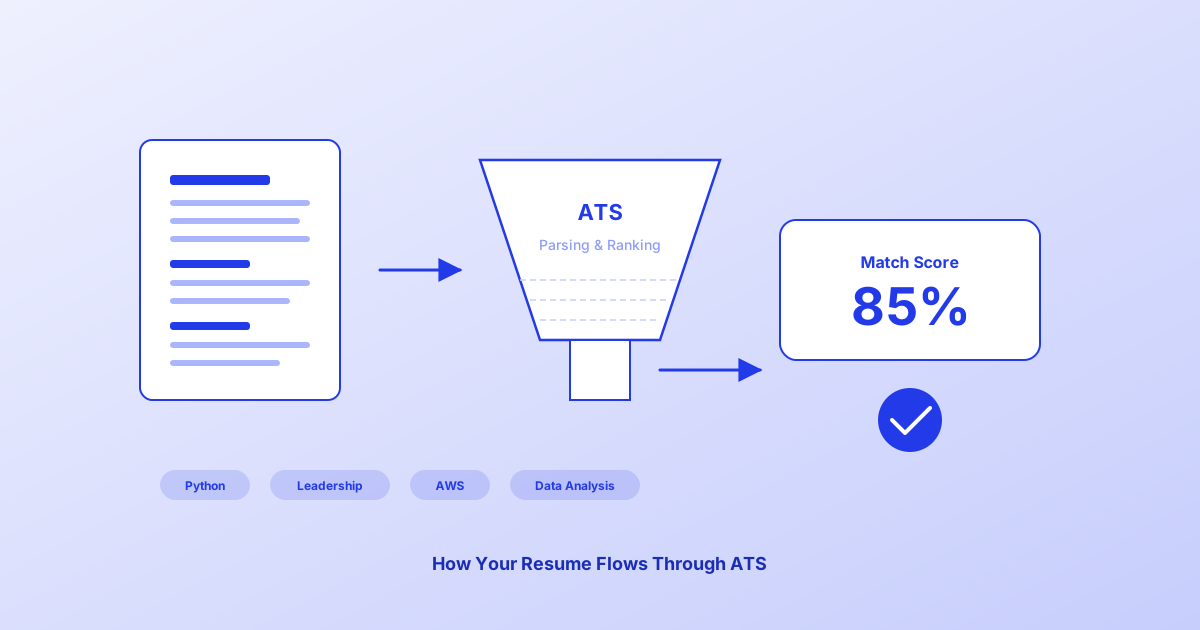
How to Pass the ATS in 2026: Getting Your Resume Through the Software Screen
Most mid-size and large companies screen resumes with software before a person reads them. Learn exactly how an ATS works and the fixes that make your resume hold up to it.
Kareeo Team6 min read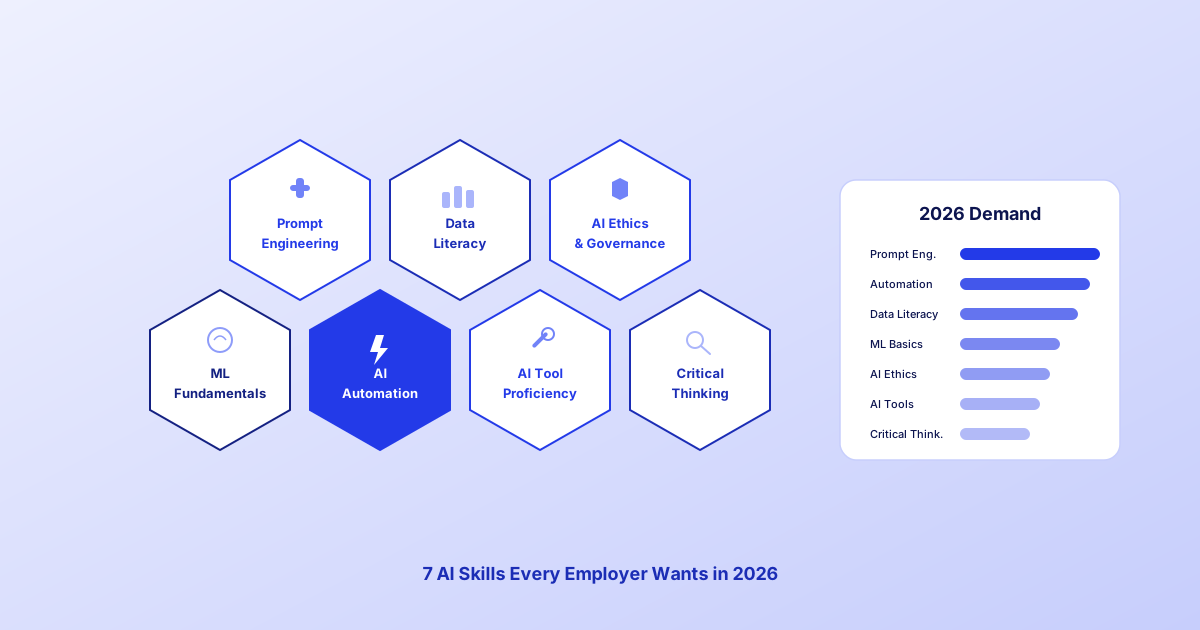
7 AI Skills Every Employer Wants in 2026
These are the 7 skills AI job postings keep asking for, and they're all learnable. Here's what each one means and how to build it.
Kareeo Team8 min read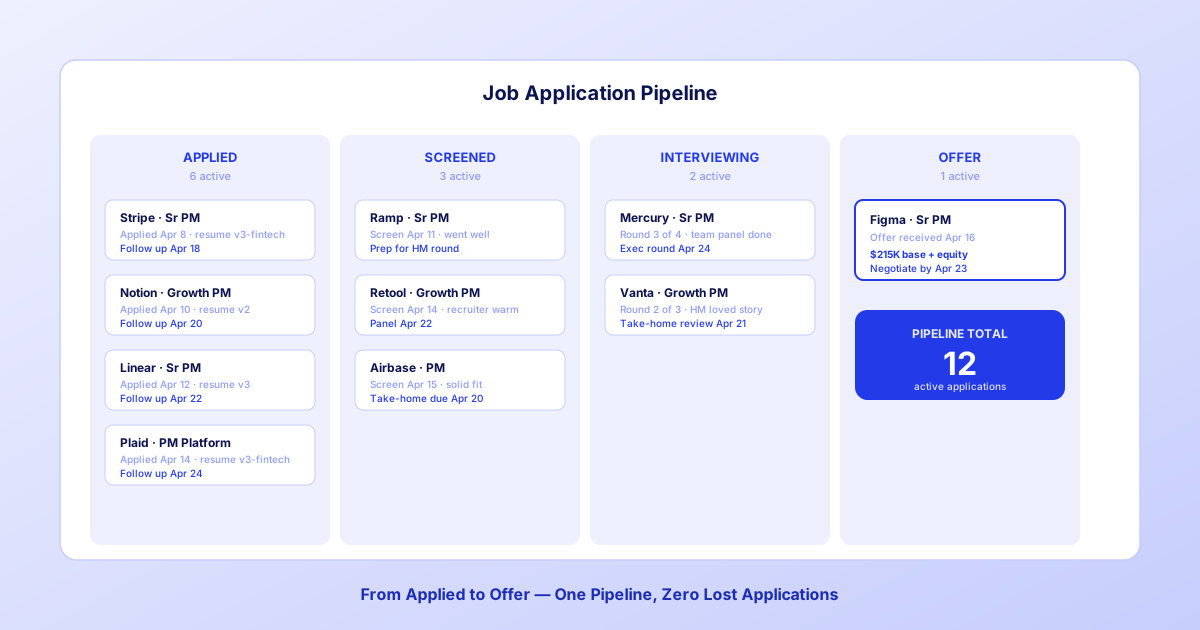
Stop Losing Track of Job Applications: The System That Gets Results
Most job seekers lose applications in a spreadsheet graveyard. Here's the tracking system that turns scattered applications into a pipeline you can work every week.
Kareeo Team7 min read